

Blume Cheat for Rust
Explore reliable cheats for your favorite games at MixCheats.
Buy the private Blume for Rust at MixCheats. Our working cheats offer aimbot, ESP, and wallhack features, ensuring safe gameplay with 24/7 support.
Our Blume for Rust is regularly updated to ensure maximum functionality and stable performance. We continuously improve features, add new functions, and optimize performance for the best gaming experience.
Choose your subscription duration to place an order
Features
Aimbot
Aimbot_options
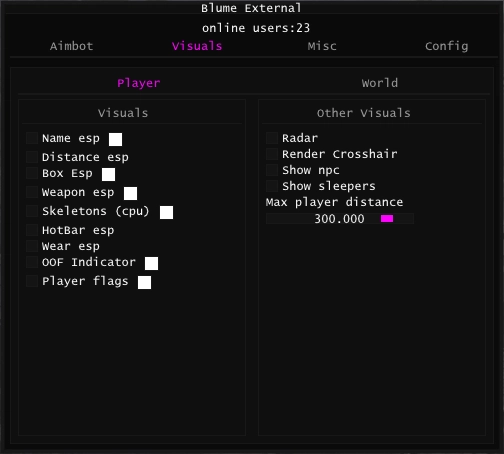
Visuals
Other_visuals
World
Misc
Other_misc
Friends
Config
System Requirements
Blume for Rust is an advanced solution designed specifically for players seeking a competitive advantage. This tool combines modern technologies and proven working methods, ensuring stable and safe operation in various game modes.
Precise aimbot with customizable parameters ensures perfect aiming. Player visualization through walls with detailed enemy information. Each feature can be individually configured according to user preferences and playstyle, allowing you to create the perfect configuration for any player.
The advantages of using Blume are obvious for experienced players. The tool provides high aiming accuracy, which is especially important in dynamic combat situations. Visual hints help quickly navigate the map and make tactical decisions. The detection protection system guarantees safe use even during long gaming sessions.
From a technical point of view, Blume is optimized for work with various versions of the Windows operating system. Regular updates ensure compatibility with the latest game versions and protection systems. The interface is intuitive even for novice users, which significantly simplifies the setup and usage process.
When using Blume for Rust, it is recommended to start with basic settings, gradually adapting parameters to your playstyle. This will allow achieving an optimal balance between efficiency and natural movements. It is important to remember that any software requires a responsible approach to use.
Technical support is available 24/7 and ready to help with any questions that arise during use. Our team constantly works on improving functionality and adding new features according to user requests. Regular updates guarantee that the tool remains relevant and effective.
The development of Blume was carried out taking into account all features of Rust. Our team conducted a thorough analysis of game mechanics, protection system, and player behavior to create a solution that works most effectively in real gaming conditions.
In conclusion, Blume for Rust is a reliable solution for players who value quality and stability. The combination of powerful functionality, convenient interface, and professional support makes this tool an excellent choice for serious players.
Frequently Asked Questions
How to install Blume for Rust?
Installing Blume for Rust does not require special knowledge. After purchase, you will receive detailed installation and setup instructions. The process takes just a few minutes and includes running the installer, configuring parameters, and activating the tool.
Is it safe to use Blume?
Blume is developed with all safety requirements in mind. The detection protection system is regularly updated to ensure maximum security. However, it is important to remember that using any additional tools in games is always associated with certain risks.
How often is Blume updated?
Blume updates are released regularly, usually within 24-48 hours after game updates. Our team monitors all changes in the game and quickly adapts the tool to new versions.
Is Blume suitable for beginners?
Yes, Blume has an intuitive interface and detailed documentation, making it accessible to players of any skill level. Initial settings are optimized for comfortable use, and advanced parameters allow experienced users to fine-tune all features.
What technical support is available?
Technical support is available 24/7 through our Telegram channel and Discord server. Our team is ready to help with any questions, tool setup, and usage consultations. Average response time is less than an hour.
Update History
Fixed minor bugs
2026-10-10 08:47:21
Updated after game patch
2026-10-08 11:39:18
Improved stability
2026-10-02 08:51:55
Updated after game patch
2026-09-25 09:48:35
Improved stability
2026-09-16 10:23:41


